
FX Algo Tools
Smart Tools For Better Trading
Bollinger Breakout
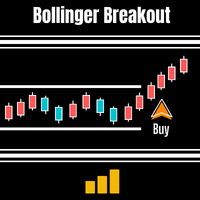
A breakout indicator designed to spot the shift from low volatility to stronger market movement
Bollinger Breakout is built for traders who want a clearer way to spot when the market may be moving out of a quiet, low-volatility phase and into a more active period. It uses Bollinger Bands, Keltner Channels, and Momentum to help identify both the breakout condition and the direction showing the stronger push.
What Bollinger Breakout Does
Bollinger Breakout is designed to tell the trader when the market may be about to break out from a non-volatile period. The idea behind the tool is that quieter market phases can sometimes build pressure before stronger movement begins. When that shift from non-volatile to volatile conditions occurs, the indicator forms a signal.
Why Traders Use Bollinger Breakout
Bollinger Breakout is designed for traders who want a more structured way to spot possible breakout conditions before a stronger move develops. By combining Bollinger Bands, Keltner Channels, and Momentum, it aims to highlight periods where volatility may be expanding while also giving a directional bias based on momentum strength. It can help traders focus on moments when the market may be shifting out of compression and into a more active trend phase. This summary is based directly on the description you provided.
How Bollinger Breakout Works
The indicator compares Bollinger Bands and Keltner Channels to judge whether the market is in a low-volatility or higher-volatility phase.
Bollinger Bands measure how far price is moving from a moving average, which creates an expanding and contracting channel. Keltner Channels use a moving average together with Average True Range, creating a steadier channel range. When the Bollinger Bands move inside the Keltner Channels, the market is treated as non-volatile. When the Bollinger Bands move back outside, it can suggest that volatility is returning and that a stronger move may be beginning.
To help decide on direction, the indicator also uses Momentum to judge which direction looks stronger and more likely to continue.
- Identifies low-volatility compression
- Highlights when volatility begins expanding again
- Uses Momentum to help judge likely direction
- Supports breakout-focused market analysis
Features
 A practical way of recognising a new trend
Lets you choose your preferred signal colours
Sends alerts to your PC, email, or mobile device
Works on any timeframe
Combines volatility and momentum in one indicator

Settings
Bollinger Breakout includes settings for Bollinger Bands, Keltner Channels, Momentum, colours, and alerts so traders can adjust the indicator to suit their own chart preferences and market approach.
Section A — Bollinger Bands
- Bollinger_Period — sets the period of the Bollinger Bands moving average
- Bollinger_Deviation — sets the standard deviation calculation
- Bollinger_MaPeriod — sets the averaging method used in the calculation: simple, exponential, smoothed, or linear weighted
Section B — Keltner Channels
- Keltner_Period — sets the period for the Keltner Channel
- Keltner_ATR — sets the Average True Range used for the channel
- Keltner_MaMode — sets the averaging method used for the channel calculation
Section C — Momentum
- Average Period Of Momentum — sets the momentum averaging period
- Averaging Method — sets the type of average used for momentum calculation
Section D — Colours
- Bullish Momentum Color — sets the bullish momentum colour
- Bearish Momentum Color — sets the bearish momentum colour
- Buy Arrow Color — sets the buy-arrow colour
- Sell Arrow Color — sets the sell-arrow colour
- Keltner Color — sets the Keltner Channel colour
- Bollinger Color — sets the Bollinger Band colour
Section E — Alerts
- Soundfile — selects the sound used for PC alerts
- PlaySound — enables or disables PC sound alerts
- MessageBox — enables or disables message box alerts
- SendEmail — enables or disables email alerts
- SendMobile — enables or disables mobile alerts
Best Suited For
Bollinger Breakout may suit traders who:
- Look for volatility expansion after quieter market periods
- Use Bollinger Bands or Keltner Channels in their analysis
- Want a more structured breakout-awareness tool
- Like momentum-based directional filtering
- Trade across multiple timeframes
This is an inference based on the product description and feature list.
Important Considerations
Bollinger Breakout is a volatility and momentum awareness tool, not a guarantee of trend continuation. It can help highlight conditions where the market may be shifting from compression into movement, but traders still need to judge context, direction, and risk carefully. Like any breakout-focused tool, it is best used as part of a broader trading process rather than in isolation. This is an inference based on the product logic described in your notes.
Pricing
Frequently Asked Questions
Q. What does Bollinger Breakout do?
It helps identify when the market may be moving from a non-volatile period into a more volatile one, using Bollinger Bands and Keltner Channels, while also using Momentum to help judge direction.
Q. How does it detect low volatility?
When the Bollinger Bands move inside the Keltner Channels, the market is treated as non-volatile. When they move back outside, it can suggest that volatility is returning.
Q. How does it choose direction?
It uses Momentum to help show which direction appears strongest and more likely to continue.
Q. Does it work on different timeframes?
Yes. According to the description, it works on any timeframe.
Q. Can I customise colours and alerts?
Yes. The settings include colour controls for signals and channels, along with PC, email, and mobile alert options.
Q. Is there a free trial?
I always give free trials, unlike other developers I believe you should know the product better before parting with any money.
Q. What after-purchase support will I get?
I love questions and feedback. I think it’s how I can learn and improve also as a developer. But, I also expect software users to read the instruction manual as most questions are answered in there. Even so please feel free to contact me via help page or by email. Usually, I respond in 24 hours. I am always glad to help.